• Skip to primary navigation
  • Skip to main content
  • Skip to primary sidebar
  • Skip to footer

DIGITAL PHOTO MENTOR

Photography tips, tutorials and guides for Beginner and Intermediate Photographers.

  • Start Here
  • Photography Basics
    • Beginner Photography Tutorials
    • Free Photography Basics for Beginners Course
  • Photography Articles
    • Beginner Photography Tutorials
    • Photography Challenges
    • Photography Tips
      • Portrait Photography
        • Flash Photography
      • Night Photography
      • Street Photography
      • Photo Editing
      • Landscape Photography
      • Macro Photography
      • Photoshop Tutorials
      • Photography Equipment
  • Courses
    • Luminar Neo: The Complete Course
    • Lightroom Classic for Photographers
    • HDR Photography the Right Way!
    • Photoshop for Photographers
    • Portrait Photography Fundamentals
  • Private Tutoring
  • Store
    • Photography Courses
    • DPM Photography Community
    • Sky Replacements
    • Bokeh Overlays
    • Texture Overlay
    • Lightroom Presets
    • Bundles
  • DPM Community
  • Login
  • Photography Basics
    • Beginner Photography Tutorials
    • Free Photography Basics for Beginners Course
  • Photography Tips
    • Portrait Photography
      • Free Portrait Photography Key Concepts Course
      • Flash Photography
    • Night Photography
    • Street Photography
    • Travel Photography
    • Landscape Photography
    • Macro Photography
    • Photography Equipment
  • Photo Editing
    • Luminar Tutorials
    • Lightroom Tutorials
    • Photoshop Tutorials
  • Photography Challenges
    • Photography Challenges E-Book
  • Gallery
  • Resources
    • Free Basics for Beginners Course
    • Free Portrait Photography for Beginners Course
    • Lightroom Presets
    • Webinars
    • YouTube Channel
  • Freebies

Home / Challenges / Get Editing Your Photos – August Photography Challenge

Get Processing Monthly Challenge

Get Editing Your Photos – August Photography Challenge

July 26, 2016 by Darlene Hildebrandt

Updated: November 23, 2025

Photography is one part technical and one part artistic. Many people may argue that once you have an image in the camera, that is where photography ends. Others prefer to use photo editing techniques to enhance the camera image and make it match their vision more closely – their artistic rendering.

Original straight from camera before presets were applied
After lit using a combination of flash and natural light at 1/30th of a second.

So which is right – to edit or not to edit?

That question is up for debate, but the topic for this month’s challenge is to get editing some images.

Try some things and experiment. If you’ve never edited photos before, now is a good time to try it and see if you like it.

You can always go back to not processing later. Or if you are a regular image processor, it’s also a good time to check out some new ideas, techniques, and methods you would never use on your own images.

Yes, that’s right I’m going to give you FIVE of my own images (JPG and DNG files) to play with!

You will get these four images, plus the one above to choose from for this challenge.

Winner of last month’s challenge – simplify

There was a boat load of entries and comments on last month’s challenge to simplify. I read all the comments and looked at all the images. Here are a few things I heard you learning:

  • I love intimate landscapes and usually use telephoto. I was surprised to discover I could make a minimalist image at 24mm. – Barbara F Smith
  • Darlene, Your challenge was perfectly timed. Our local club, The Southern Colorado Photography Society, held their annual outing downtown Pueblo (snip). Having photographed the area many times, your challenge gave me a new perspective, so to speak, and shaped my entire shooting experience for the day. One of the things about your challenge is it got me focusing on elements of design. So on the photo walk, I was looking for tonal ranges, shapes, leading lines, etc. – David Hayden
  • This challenge was a great one as it gave me an opportunity to look closer and more critically at what I choose to photograph. By this I mean to focus more on what I see, and in so doing, look at different ways to capture it. I’m sometimes too “trigger happy” and just want to take the shot without really looking at how else the scene can be captured. A great lesson learned. – Folake Abass
  • I learned from this lesson, it’s not all about the gear, it’s what you see before you and how you capture it. – P James
  • I went to shoot Waterton lakes at sunset with my brother, but we didn’t have the amazing colors we were hoping for, and I was disappointed until I remembered this challenge and decided to focus on “simplify”. The view was amazing and almost overwhelming of mountains and lakes, so I got some decent shots of the whole view, but the ones I really like, are the ones where I focused on one element. – Rebecca Cullimore
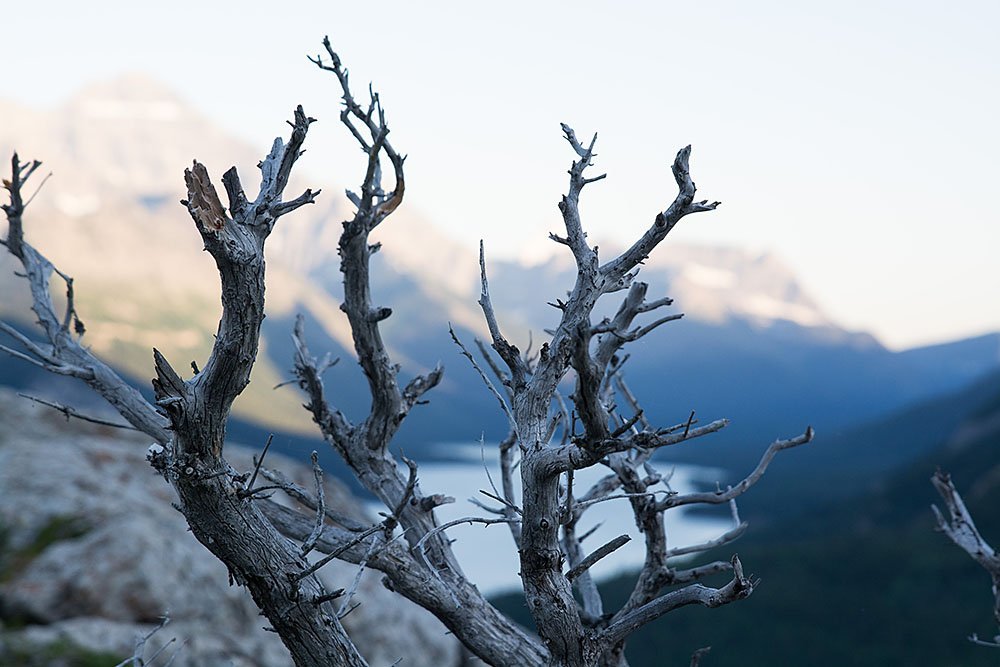
original
Rebecca’s image
  • “I always tend to put too much in a picture in order to share the emotion of the subject. Thank you for reminding me that often, less tells more! – Solange Paquette
  • When I was reviewing the images, I realized that even a simple picture can tell a larger story. Looking at the bike hub, you can see the dirt and grease that tells you this bike is not a showpiece. It’s *used*. The bolt has a little rust on it, which can tell you that it was left outside a few times, or at least it got a little wet. But you can also see that the spokes, frame, and paint are in good condition, so it does get *some* care. That also reminded me that you can sometimes tell a better story if you leave details out. – Wayne Werner
  • And the winner of the Simplify challenge is . . .

    Each month we randomly select one winner from all the eligible entries and this month it was:

    Lynne – who took this fabulous “simple” image of a New Zealand Koru fern. She will be getting five of her images reviewed privately by me. Congratulations!
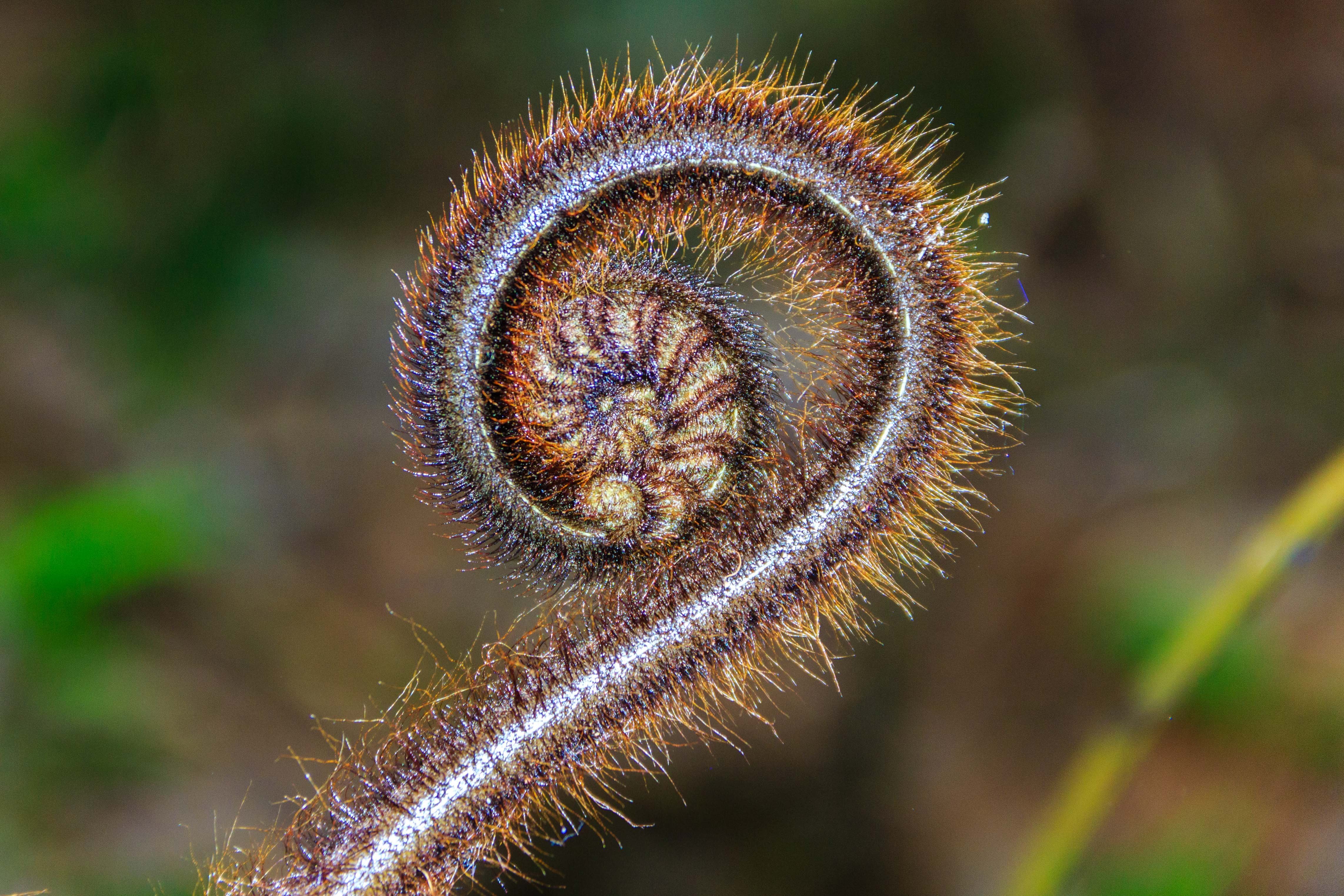
    original
    Image by Lynne

    Details of this month’s challenge – Get Editing

    First of all you need to download the images to participate in this challenge. You can download either the full raw files (as DNGs) or full JPGs (unedited straight from the raw files). If you are using free software or an online one, use the JPGs. If you are familiar with processing raw files grab the DNGs.

    Download them by clicking on the one you want, then clicking the down arrow at the top of the screen to save it to your computer. Please DO NOT upload your finished files to these folders this is for downloading only!

    • Grab the JPG files here.
    • Grab the DNG files here.
    download
    Click the down arrow to grab the file you want.

    They are large files – so they may take a while to download. If you have trouble let me know.

    There are many ways and many tools with which to process images. My tools of choice are mostly Lightroom and Photoshop, with a few plugins on the side. If you have Lightroom or Photoshop you can check out some of these for tips:

    Lightroom articles:

    • Using the Basic Sliders in Lightroom and Photoshop; a Comprehensive Tutorial
    • Correct Your Images in Under 2 Minutes Using Lightroom 5
    • Clarity Versus Contrast and How to Use Them to Make Your Photos Pop
    • Learn to MASTER Lightroom in my new Lightroom for Photographers course

    Photoshop articles:

    • How to Create a Neat Text Effect in Photoshop
    • Making Art With Your Photography
    • How to Give Your Pictures an Authentic Vintage Appearance
    • Learn how to use Photoshop in my Photoshop for Photographers course

    If you don’t have or use either of those you could try out some of the free options available such as:

    • GIMP
    • Darktable
    • Picmonkey
    • Paint.net
    • Snapseed (it’s not free but it’s only a few bucks and works on your tablet or mobile devices only – get the Android version here – or for iOS devices here.

    Examples

    So if you want to see what I did with the images provided here are a few versions I’ve used different places:

    Black and white version
    Black and white version
    Color version
    Color version
    Basic version
    Basic version
    Textured and an edge frame applied using a plugin by Macphun.
    Textured and an edge frame applied using a plugin by Macphun.
    B/W version
    B/W version
    Color version.
    Color version.

    To be eligible to win the prize:

    In order to participate in this challenge and be eligible for this prize you need to:

    1. Upload your processed version of one of the images provided to the comments section below
    2. Tell us how you processing it (what software or online tools, what things did you try and apply).
    3. Tell us about your experience and what you learned by doing this challenge? Is this your first time processing images? How did it feel? Did you enjoy it? Was it fun? Did you feel creative? If you’re not new to processing – did you try a new technique? Tell us about that.
    4. Upload your photo, processing info and what you learned by the cut-off date of August 31st, 2016 (11:59 pm EST or UTC-5). NOTE: please do NOT save your images as TIF (they will be too big to add in the comments, must be under 2mg) and please do NOT email your images to me for critique. I cannot give personal critiques by email, leave your images below and I will comment there..
    5. Indicate whether you use a Mac or a PC (this will dictate eligibility for prizes, see bel0w)
    Please note: if you do NOT fulfill all the steps above your entry will not be valid. Just adding the photo will NOT be counted as an entry. I want to hear about it too please. The point of these challenges is to help you learn something new – tell me about that.

    You may post more than one finished photo, and do this as many times as you like over the month (you can comment as many times as you like, and share as many processed versions of the photos provided as you want – but it will be counted as one entry per person). The more you practice the better you’ll get at it, like anything – so share away. I also encourage you to share the link to this challenge with a friend so you can do it together!

    DPM-processing-challenge-750px-06
    Edited version
    DPM-processing-challenge-750px-07
    Processed to taste in a grunge sort of look.

    The Prize

    This month’s winner (selected randomly) will receive a set of our Lightroom Presets (value $19).

    And Skylum has graciously added a copy of their Creative Kit software, a $179 software package for Macintosh computers, for a second winner ( mac only).

    Now get processing and let’s see what you come up with!

    Darlene-1-250x130.png

    Cheers,


    About Darlene Hildebrandt

    Darlene Hildebrandt, Master of Photographic Arts (MPA), is a Canadian photography educator and the founder of Digital Photo Mentor. She holds Canada's highest professional photography designation from Professional Photographers of Canada, served as Managing Editor of Digital Photography School, and represented Canada on Team Canada at the 2025 World Photographic Cup. With over 35 years of experience, from darkroom film retouching to modern digital editing, more than 17,000 students have learned to edit with confidence through her structured online courses in Luminar Neo and Lightroom Classic and the Digital Photo Mentor Community.

    Digital Photo Mentor Community

    online photography community

    Learn, share, and feel supported!

    Join our friendly photo community for kind feedback, monthly challenges, and live help from Darlene — safe, private, and troll-free.

    Search

    Top Beginner Articles

    • Is Luminar Neo the Best Beginner Photo Editing Software?
    • Avoid these 9 beginner photography mistakes
    • 7 Tips for Beginner Photographers
    • Top 15 Photography Accessories under $25
    • How to choose the best digital camera for you
    • 5 Photography Ideas for When There's Nothing Interesting to Shoot
    • 5 mistakes beginner photographers make while using a wide angle lens and how to avoid them
    • 9 Tripod Mistakes Ruining Your Images and Putting Your Camera at Risk
    • How to Use a Flash - Tips for Total Beginners

    Top Intermediate Articles

    • 10 Camera Settings and Equipment Tips for Portrait Photography
    • Best Photo Editing Software Reviewed
    • How to Use a Gray Card for Custom White Balance and Metering
    • Night Photography Settings – Guide to Getting the Best Exposure
    • To HDR or Not - When and If You Should Use HDR
    • Night Photography Settings - Guide to Getting the Best Exposure
    • Setting up a Good Digital Photography Workflow - Dos and Don'ts
    • Lightroom Alternative: Is Luminar the answer?

    Recent Photography Articles

    • What is Quality of Light in Photography and How to Use it to Take Better Photos
    • How to Fix Masking Halos in Luminar Neo with Feather and Shift Edge
    • Taking Candid Photos at Home – 6 Tips for Capturing Memories
    • Top 9 Settings to Reset on your Camera After Every Use
    • Can Mindfulness Make Your Photos Better?

    Useful Links

    • Beginner Photography
    • Intermediate Photography
    • Photography Challenges
    • Photography Tips
    • Photo Editing
    • Resources
    • Course Login
    • Workshops
    • Webinars
    • Contact

    Copyright © 2026 Digital Photo Mentor · Privacy Policy · Cookie Policy · Disclaimer · Terms of Service · Privacy Settings

    Review My Order

    0

    Subtotal

    Taxes calculated at checkout

    Checkout
    0

    Notifications